Tag: AI-powered data loading

  • Product managers don’t control the product — we can only aspire to intervene

    Product managers don’t control the product — we can only aspire to intervene


    I never set out to study architecture engineering. I stumbled into architecture almost by accident. But once I was there, I was hooked.

    It was the perfect intersection of engineering and art. I can still see my professor at the chalkboard sketching a design in seconds, narrating an architectural style as if he were pulling it straight out of thin air.

    Architecture wasn’t just about lines on paper. In materials engineering, I learned how the right choices could balance insulation, sustainability, and aesthetics. In structural engineering, I discovered the art of the possible: Would this design hold? Could it withstand a flood or an earthquake?

    I felt found.

    But life had other plans. I had to switch colleges (that story for another day), and the new one didn’t offer architecture. So, I enrolled in computer engineering instead. Studying programming, data structures, databases, software engineering — the whole enchilada.

    From there, my career journey carried me from writing backend code, to delivering customizations in professional services, and ultimately to product management — my home for the past two decades. I fell in love with the craft of product management, but my fascination with architecture never disappeared; it lingered quietly in the background.

    YES IS MORE

    Recently, while trying to clear my head before diving into my latest project — DataIAm (the app and the website) — I picked up a book by Danish architect Bjarke Ingels, titled YES IS MORE. I thought it would be an escape, something unrelated to work. Turns out, it was the opposite: an architecture book that spoke directly to my product management soul.

    One page stopped me in my tracks:

    “Architecture is never triggered by a single event, never conceived by a single mind, and never shaped by a single hand…. We architects don’t control the city — we can only aspire to intervene.”

    I read it once as an admirer of architecture. Then I read it again as a product manager. And I realized: the same is true of products.

    Slightly reworded, it could have read:

    A product is never triggered by a single event, never conceived by a single mind, and never shaped by a single hand…. We product managers don’t control the product — we can only aspire to intervene.”

    That hit me.

    The Architecture of Products

    In architecture, you balance the technical (Will the structure hold up?) with the artistic (Will people feel inspired, connected, at home here?).

    Product management, it turns out, is no different. It’s half engineering and half art. It’s about building consensus — not by simply creating what everyone already agrees on, but by bridging the gap between what people like, what they want, what they think they need, and what they’ll only realize they love once they have it.

    Over the last two decades, I’ve had the privilege of designing and launching many products. But as I was shaping DataIAm, the philosophy of YES IS MORE gave me a new lens. Had I not read that book, the design and build of DataIAm app and website would have looked very different. What seemed like an “unrelated” book turned out to be deeply related, reinforcing that products — like buildings — are about creating spaces where people belong, thrive, and say: “This is exactly what I didn’t know I needed.”

    YES IS MORE (than architecture)

    Bjarke Ingels titled his book YES IS MORE as a playful response to Mies van der Rohe’s mantra “Less Is More” — a phrase we product managers often find ourselves saying, too.

    But in product management, YES IS MORE isn’t about saying yes to everything. It’s about saying yes to bold ideas — the ones that connect engineering with art, push boundaries while pulling people in.

    That’s why I’ve come to believe:

    Software product managers are just building architects in disguise.

    We may not shape skylines, but we shape the digital spaces where people live parts of their lives. And just like great architecture, the best products don’t just meet needs — they surprise us with a sense of belonging we didn’t know we were missing.


    To learn more about DataIAm visit: https://dataiam.com

    Zeb Mahmood

    Zeb Mahmood Co-Founder & CEO DataIAm

  • DataIAm: PR/FAQ

    DataIAm: PR/FAQ

    The “PR/FAQ” documents are fictitious press releases. See details:

    This document outlines the vision, problem, and solution
    behind the founding of DataIAm.

    It is intended to be publicly shared to explain what we’re
    building and why it matters.

    Inspired by Jeff Bezos’ practice at Amazon, this is the
    fictitious press release we wrote in June 2024—
    before writing a single line of code.

    The product became publicly available in February 2025.


    📣 Press Release

    DataIAm Launches AI-Powered Salesforce Data Loader

    San Francisco, CA — February 24, 2025 — Today marks the launch of DataIAm, an AI-powered data loader purpose-built for Salesforce. Designed for Salesforce Admins and data professionals alike, DataIAm brings AI intelligence to the data loading process—automatically detecting common issues, suggesting intelligent fixes, and ensuring clean data is loaded into Salesforce.

    Salesforce Admins have long been frustrated that data loaders are just that—loaders. They’re forced to manually fix broken or messy data, often in spreadsheets, before even attempting to import it. DataIAm reimagines this workflow by providing an intelligent, supportive interface that streamlines both data cleanup and loading.

    “We’re reimagining the data loading experience from the ground up,” said Zeb Mahmood, co-founder of DataIAm. “No more manual cleanup. Just upload your messy CSV—and let our AI fix and load it for you.”

    Zeb brings over nine years of product leadership experience at Salesforce and two decades of building data platform products. His deep understanding of enterprise applications and integration pain points inspired the creation of DataIAm.

    Customer feedback has already been enthusiastic.

    “I used to spend hours cleaning data in Excel just to get it ready for a Salesforce import. Now I just toss the CSV into DataIAm, and it does the fixing for me. What used to be a painful chore is now a quick, confident step,” said Jessica Lin, Salesforce Admin at AcmeTech.

    “Having clean, accurate data in Salesforce is a game-changer for our pipeline health and forecasting accuracy. DataIAm gives me confidence in the numbers we’re reporting upstream,” said Raj Mehta, CRO at Cresthill Systems. “Once the data is in Salesforce, it’s 100x more expensive to clean. DataIAm is our gatekeeper for good data!”

    This ability to save hours of manual cleanup work is where DataIAm delivers its biggest value. Admins can now focus on delivering business value instead of wrangling spreadsheets and VLOOKUPs.

    Try DataIAm for free at https://dataiam.com—no credit card required. You can sign in using your Salesforce credentials (SSO supported) and get started in minutes.


    Key Features

    Here’s what sets DataIAm apart from traditional data loaders:

    • Auto-detects target object and fields based on your CSV—even if headers are missing or incorrect
    • Fixes malformed CSVs, like addresses crammed into a single column
    • Suggests intelligent fixes for invalid picklist values, incorrect formats, and more
    • Fetches missing Record IDs using match fields—no need for Excel VLOOKUPs
    • Normalizes values based on field type (e.g., for Revenue field, $100M → 100000000.00)
    • Lets you preview fixes before loading into Salesforce
    • Supports SSO login with your Salesforce ID—no extra logins to manage
    • Free to use, with no credit card required

    FAQ

    What is DataIAm?

    DataIAm is a Salesforce data loader powered by AI. Unlike other data loaders, it helps users fix the data before loading—no engineering skills required.

    Who is it for?

    DataIAm is designed for Salesforce Admins and non-engineering users who regularly deal with data import/export tasks, as well as for data professionals who want to save time on cleanup. Our primary persona is “Alex Smith,” a Salesforce Admin who juggles multiple data tasks without writing code.

    Why are you building this?

    Because current tools are just loaders. But in reality, every CSV is messy in its own way, and the Admin is often left to clean up that mess before loading the data. We believe the loading experience should have fixing of data built-in; it should be intelligent, contextual, and supportive—just like a good assistant. And more importantly, it should save users hours of spreadsheet wrangling and guesswork every time they prepare a file.

    Fixing data before it enters Salesforce is not just more efficient—it’s essential. Once bad data is loaded, the cost to detect and fix it skyrockets. Broken flows, inaccurate dashboards, failed automations, and degraded user trust all stem from poor data hygiene. In the age of AI, accurate and timely data is everything—because AI is only as good as the data it learns from and operates on.

    What’s next?

    Salesforce is the first ecosystem; we’ll be building AI-powered data loaders for ServiceNow, NetSuite, Workday, and many more.


    To learn more or sign up: https://dataiam.com

    Zeb Mahmood

    Zeb Mahmood Co-Founder & CEO DataIAm

  • Now querying: Related objects

    Now querying: Related objects

    Let’s be honest—querying related objects in Salesforce isn’t exactly fun.

    If you’ve ever tried pulling a report of Opportunities along with Account names and the Owners’ aliases, you’ve probably ended up with multiple browser tabs open for SOQL dot notation help, a couple of manual VLOOKUPs, and maybe even a silent prayer.

    We’ve been there. So we made it better.

    We’re thrilled to announce a major upgrade to our Extract functionality (a.k.a. Salesforce Query Builder) in DataIAm:

    You can now query related objects in Salesforce—with just a few clicks!

    What Are Related Objects in Salesforce?

    Salesforce data is stored in a web of related objects—like linked database tables. A few examples:

    • A Contact belongs to an Account
    • An Opportunity is tied to both an Account and an Owner
    • A Case links to a Contact and an Account

    Also see: Object Relationships Overview by Salesforce


    How to Query Related Objects with DataIAm

    Until now, if you wanted to export data with related fields, you had to export one object at a time, merge them in Excel using VLOOKUP, and hope nothing breaks.

    But now you can: choose your base object, then select related fields across related objects—visually and with zero SOQL (yes, no guessing the dot-notation syntax).

    ✅ Select any standard or custom Salesforce object
    ✅ Browse related objects and pick the fields you want
    ✅ Preview your result set before full extraction

    It’s clean, intuitive, and designed for Salesforce admins, analysts, and consultants who just want the data—without the SOQL and spreadsheet drama.

    ⚠️ Like native SOQL and most third-party tools, you can go up the relationship chain — from child to parent (e.g., Opportunity → Account → Owner). However, you can’t yet go down (e.g., Account → all Contacts). We’re working on a way to support that for you — even though SOQL itself doesn’t natively allow it.


    Example: Query Related Salesforce Data

    Let’s say your manager asks for a list of open Opportunities that includes:

    • Opportunity Name
    • Account Name
    • Owner’s Alias

    In DataIAm, just:

    1. Select the Opportunity object and the Name field
    2. From Related Objects:
      • Choose Account → Name
      • Choose Owner → Alias
    3. See the auto-generated SOQL:
      SELECT Name, Account.Name, Owner.Alias FROM Opportunity
    4. Preview result set → Run job → Done!

    Also see the blog post: Visual Query Builder


    Modern DataIAm vs. Clunky Old Data Loaders

    With this latest enhancement, DataIAm is now more functionally capable than any leading data loader in the market. (Not bragging — just stating the facts.)

    Unlike traditional tools, DataIAm includes smart, AI-powered capabilities like:

    ✅ Flagging and fixing invalid picklist values
    ✅ Fetching missing Record IDs
    ✅ Correcting inconsistent data formats
    ✅ Previewing (and downloading) cleaned data before loading

    Want to see how DataIAm compares to Salesforce Data Loader (desktop) and MuleSoft dataloader.io? Check out our side-by-side feature comparison — a.k.a. the “truth table” — right here: https://dataiam.com/#data-loaders-side-by-side 


    TL;DR

    You can now query related objects in Salesforce using the DataIAm SOQL Query Builder—a visual, no-code way to quickly extract Salesforce data from related objects.

    No SOQL scribbling → SOQL with dot notation is generated for you

    No VLOOKUP dance → Select related fields visually

    No trial-and-error guessing → Preview the result set before exporting


    Try it FREE at: dataiam.com
    Or email our co-founder, Zeb, at TryNewThings@dataiam.com for a live walkthrough.
    We’d love to hear your use case!


    About the Author

    Zeb Mahmood has spent his career unlocking business value by moving, fixing, and loading data—first as an engineer, then as a product leader, and now as a cofounder.

    With 2 decades in product management, 9 years at Salesforce, and hands-on experience in early-stage startups, he’s learned a simple truth: data is the lifeblood of every business. But when it’s messy or trapped in spreadsheets, it can’t drive impact.

    That’s why Zeb cofounded DataIAm — a Fix & Load AI built for Salesforce Admins and data handlers who just want their data to work. No frustration. No failed imports. Just clean, reliable data that loads seamlessly into Salesforce and delivers results.

    Zeb believes great products don’t win on tech alone — they win through empathy. Empathy for users, buyers, partners, and the people building the product every day.

    Zeb Mahmood

    Zeb Mahmood Co-Founder & CEO DataIAm

  • Visual data cleaning

    Visual data cleaning

    Don’t just imagine how your data will look after you apply fixes. See it — before you load.

    If you’ve used any Salesforce data loader — whether it’s Salesforce’s own tools (like Salesforce Data Loader or MuleSoft dataloader.io) or third-party options like Informatica or Jitterbit — you know the routine: upload a CSV, map fields, apply data transforms, hit load, and hope everything works.

    What’s missing? Visibility. These tools don’t show you how your data will actually look after data transforms are applied. 

    That’s where visual data fixes come in — only from DataIAm.

    What Makes It Visual?

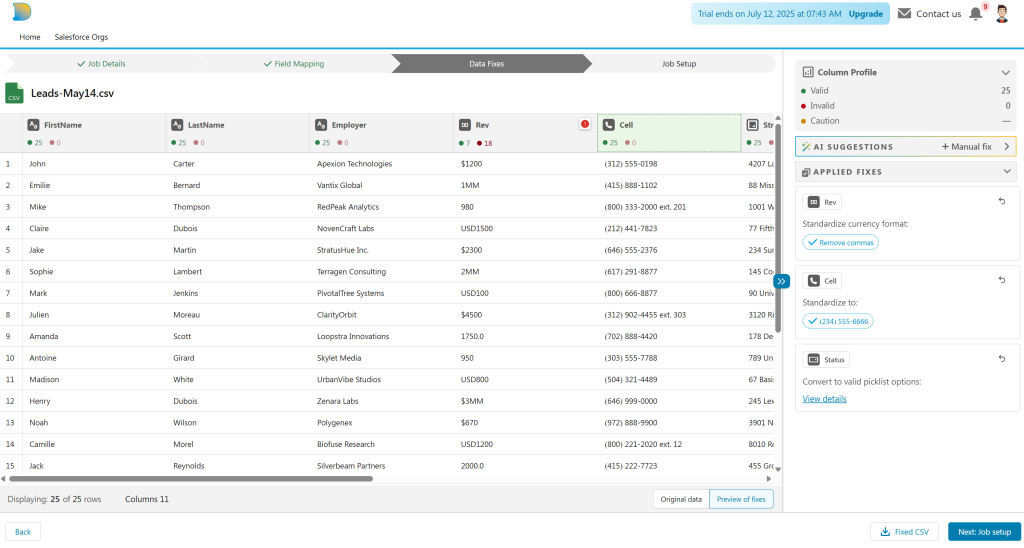
    The magic happens on the Data Fixes screen.

    After you upload your spreadsheet or CSV, DataIAm does a column-by-column health check. You see how many values are valid, and which ones need fixing. For the invalid ones, AI steps in to help — suggesting fixes (aka data transforms) that are specific to your Salesforce org’s schema; including custom fields and objects.

    Examples of AI-suggested fixes include:

    • Converting invalid picklist values
    • Standardizing phone numbers
    • Fetching missing Record IDs for update jobs

    And here’s the best part, the visuals: you see the data change right in front of you — before anything is sent to Salesforce. No guesswork. No risky trial runs. Just clarity.

    You can toggle between “Original data” and “Preview of fixes” tabs to compare before-and-after values. You can even download the cleaned file before you move forward.

    It’s a What You See Is What You Get (WYSIWYG) approach to Salesforce data — finally.

    More Than a Data Loader

    Even if visual data fixes were all we offered, it would make DataIAm worth using. But there’s much more under the hood:

    • Insert, update, upsert, delete, and extract jobs
    • AI-powered field mapping — even when your spreadsheet has no headers
    • Visual SOQL query builder with result-set preview
    • Smart V-Lookup (coming soon!) — think VLOOKUP function of spreadsheets, but purpose-built for Salesforce data loading use cases

    Try It Free

    Experience a new way to fix and load Salesforce data.  Sign up for free

    Have suggestions? Something you’d love to see? Email us at TryNewThings@dataiam.com


    Keywords: #SalesforceDataLoader #SalesforceAdmin #VisualDataFixes #DataQuality #DataCleaning


    About the Author

    Zeb Mahmood has spent his career unlocking business value by moving, fixing, and loading data—first as an engineer, then as a product leader, and now as a cofounder.

    With 2 decades in product management, 9 years at Salesforce, and hands-on experience in early-stage startups, he’s learned a simple truth: data is the lifeblood of every business. But when it’s messy or trapped in spreadsheets, it can’t drive impact.

    That’s why Zeb cofounded DataIAm — a Fix & Load AI built for Salesforce Admins and data handlers who just want their data to work. No frustration. No failed imports. Just clean, reliable data that loads seamlessly into Salesforce and delivers results.

    Zeb believes great products don’t win on tech alone — they win through empathy. Empathy for users, buyers, partners, and the people building the product every day.

    Zeb Mahmood

    Zeb Mahmood Co-Founder & CEO DataIAm

  • SOQL Query Builder

    SOQL Query Builder

    Salesforce users have long sought easier ways to build Salesforce Object Query Language (SOQL) queries. Feature requests like this IdeaExchange post highlight the demand for a query builder that’s more usable and intuitive.

    While Salesforce does offer tools like the Query Editor, they come with several limitations:

    • Limited or no support for browsing custom objects or fields
    • No visibility into field data types or relevant operators
    • Limited or no support for related objects
    • No generation of date literals for date/datetime fields

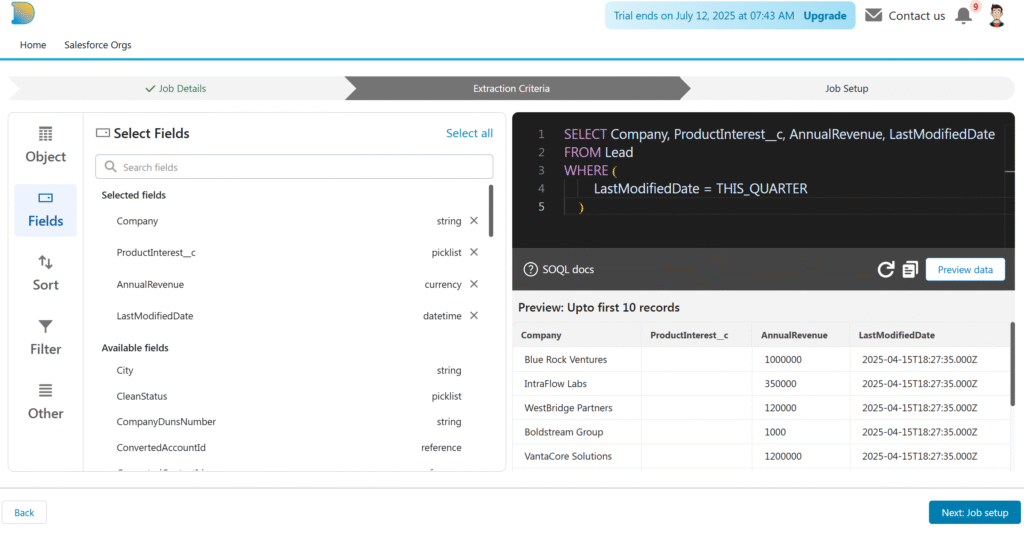
    DataIAm addresses these gaps with a visual SOQL query builder, available at app.dataiam.com.

    Generate SOQL Queries with Confidence

    Query Builder

    DataIAm offers a visual query builder designed for Salesforce admins and business users who want to build valid, reliable SOQL queries—without handwriting SOQL.

    Key Capabilities

    Browse standard and custom objects

    Explore objects and fields—both standard and custom—through a clean, point-and-click interface.

    Data type–aware filtering

    Only relevant operators are shown based on each field’s data type. For example:

    • =, <, > for numeric fields
    • CONTAINS, STARTS WITH, ENDS WITH for text fields

    Date literal support

    For date fields like LastModifiedDate, the builder presents Salesforce-supported date literals such as YESTERDAY, LAST WEEK, LAST QUARTER, and more—removing the need to look up syntax.

    Relationship navigation

    Easily access fields from related objects (e.g., pulling Contact fields while querying Account records).

    Syntax validation

    Perform client-side SOQL syntax validation before submitting the query to Salesforce; avoid unnecessary API errors or quota waste.

    Data preview

    Preview the result set before executing the full query.

    Part of a Feature-Rich Data Loader

    The query builder is part of the broader DataIAm platform, which also includes:

    • Insert, update, upsert, and delete operations (lookup coming soon)
    • AI-powered field mapping between CSV columns and Salesforce fields
    • CSV file restructuring to enable 1-to-1 column-to-field mappings
    • Automated data fixes for invalid picklist values, missing Record IDs, and formatting errors

    Together, these capabilities allow non-engineers (e.g. Salesforce administrators) to handle complex data loads and extracts—filling important functionality gaps left by native Salesforce Data Loader and many third-party tools.

    Try It and Tell Us What You Think

    DataIAm is continuously evolving based on user feedback. Have suggestions or feature requests? Reach out at TryNewThings@dataiam.com.

    To try the query builder, sign up for free access →


    About the Author

    Zeb Mahmood has spent his career unlocking business value by moving, fixing, and loading data—first as an engineer, then as a product leader, and now as a cofounder.

    With 2 decades in product management, 9 years at Salesforce, and hands-on experience in early-stage startups, he’s learned a simple truth: data is the lifeblood of every business. But when it’s messy or trapped in spreadsheets, it can’t drive impact.

    That’s why Zeb cofounded DataIAm — a Fix & Load AI built for Salesforce Admins and data handlers who just want their data to work. No frustration. No failed imports. Just clean, reliable data that loads seamlessly into Salesforce and delivers results.

    Zeb believes great products don’t win on tech alone — they win through empathy. Empathy for users, buyers, partners, and the people building the product every day.

    Zeb Mahmood

    Zeb Mahmood Co-Founder & CEO DataIAm

  • DataIAm — Product roadmap

    DataIAm — Product roadmap

    Since launching DataIAm, we’ve focused on doing one thing really well: loading data into Salesforce with confidence. We’ve helped users move faster and trust their data more — with zero code.

    What’s Available Today

    DataIAm already offers a robust set of features that empower users to fix and load data with ease:

    • Insert, update, upsert, and delete records in Salesforce (Sales Cloud, Service Cloud, and all Salesforce platform clouds)
    • Extract data using our visual SOQL query builder, including support for related objects
    • Fix invalid data with just a few clicks — including picklist mismatches and formatting errors
    • Update records even when Record IDs are missing

    What’s on the Roadmap

    We’re excited to share what’s on our roadmap. We’re building the most effortless, yet powerful data loader for Salesforce. The roadmap reflects the voice-of-the-customer and our own innovation ideas. Items are not listed in order of priority.

    • Conversational UI: Just chat with your data loader e.g., “Load this file over the weekend”
    • Self-Healing Mappings: Automatically fix outdated or broken field mappings
    • Usage Metrics: Track numbers of product usage e.g., records fixed, loaded, and enriched
    • Formula Fields: Create values for fields based on formulas
    • Smart V-Lookups (smarter alternative to the dreaded VLOOKUPS):
      • Simulate JOIN operation between rows in source file and records in Salesforce with support for AND and OR logic
      • Choose between exact, partial, fuzzy, or value-equivalent match types
    • Data Enrichment: Enrich with data from D&B, Reuters, LinkedIn, and other third-party sources
    • Data Verification: Verify street addresses, business names, web-domains, etc
    • Toggle Validation Rules: Turn validation rules (in your Salesforce org) off during loads — and back on automatically
    • Rollbacks: Undo a bad job
    • Personally Identifiable Information (PII) Redaction: Automatically mask sensitive info e.g., email addresses
    • Data Migrations: Move data between Salesforce orgs
    • File Formats: Load data from Microsoft Excel and Google Sheets
    • Data Sources: Load data from Google Drive, Microsoft OneDrive, AWS S3, SFTP, Snowflake, Databricks, etc
    • API: Access product features via API — plug DataIAm into your workflows
    • AI-Powered Mapping Correction (A2A + MCP): Fix broken or outdated mappings using AI-powered pattern recognition, user behavior, and schema changes
    • Salesforce AppExchange: Deploy DataIAm natively as a Salesforce Managed Package from AppExchange
    • Grow Salesforce Ecosystem: Integration with acquired Salesforce products (i.e. not on Salesforce core platform) e.g., Slack, Commerce Cloud, Industry Clouds, Tableau, and Marketing Cloud
    • Grow Beyond Salesforce: HubSpot, ServiceNow, NetSuite, Workday, Adobe Marketing Cloud, and many more enterprise SaaS apps
    • Accessibility: Improve accessibility with WCAG 2.0 compliance
    • HIPAA, SOC 2 and FedRAMP compliance
    • Idea Exchange: For customers to suggest new features, upvote existing ideas, and see what’s planned

    Final Thoughts

    Our goal is simple: take the pain out of fixing and loading data.

    Everything on this roadmap is inspired by conversations with users like you. Whether you’re loading millions of records or fixing a single broken CSV, we want to help you move faster, with less friction, and more confidence.

    Have an idea or a feature you’d like us to prioritize? We’d love to hear from you — email us at TryNewThings@dataiam.com.

    ⚠️Safe Harbor

    This blog post outlines our current product vision and roadmap. It is intended for informational purposes only and should not be relied upon when making purchasing decisions. The development, release, and timing of any features remain at our sole discretion and are subject to change.


    About the Author

    Zeb Mahmood has spent his career unlocking business value by moving, fixing, and loading data—first as an engineer, then as a product leader, and now as a cofounder.

    With 2 decades in product management, 9 years at Salesforce, and hands-on experience in early-stage startups, he’s learned a simple truth: data is the lifeblood of every business. But when it’s messy or trapped in spreadsheets, it can’t drive impact.

    That’s why Zeb cofounded DataIAm — a Fix & Load AI built for Salesforce Admins and data handlers who just want their data to work. No frustration. No failed imports. Just clean, reliable data that loads seamlessly into Salesforce and delivers results.

    Zeb believes great products don’t win on tech alone — they win through empathy. Empathy for users, buyers, partners, and the people building the product every day.

    Zeb Mahmood

    Zeb Mahmood Co-Founder & CEO DataIAm

  • Why a Salesforce-specific data loader?

    Why a Salesforce-specific data loader?

    In our last post, we explained why ETL and iPaaS aren’t substitutes for Salesforce-specific data loaders. They’re designed for “any-to-any” integration—and require enterprise engineers to build and maintain them.

    Today, let’s talk about the opposite kind of product—one built just for Salesforce. Designed so well, it feels effortless.

    DataIAm: Master of one

    When we set out to build DataIAm, we made a conscious decision:

    • One source — spreadsheet/CSV
    • One destination — Salesforce
    • One target user — the Salesforce Admin

    That’s it.

    We didn’t want to solve every data problem. We wanted to solve one problem phenomenally well—making life better for the people who keep Salesforce running.  Salesforce Admins are technical, often certified, and deeply familiar with their org. But asking them to build complex ETL pipelines just to load a CSV? That’s not a great use of their time. They’re already juggling: System maintenance, user management, dashboards and reports, and automations and workflows.

    Spreadsheets are messy. We embrace that.

    Chaos vs Organized data

    Real-world spreadsheets rarely come clean. They usually look like this:

    • Columns in random order with missing or unclear headers
    • Mixed values like “$100K” and “USD 200M” for numeric (currency) fields
    • Invalid picklist values
    • Empty required fields
    • Missing Record IDs (for update jobs)

    Instead of forcing admins to clean the data beforehand—or learn dozens of transformation rules—DataIAm uses AI to do the fixing. Automagically. 🪄

    But this isn’t generic AI. It’s tuned for Salesforce.

    Here’s what DataIAm does:

    • Understands the data in each column—even without headers
    • Maps each column to the correct Salesforce field
    • Reads your Salesforce org’s metadata (picklist options, data types, required fields)
    • Suggests fixes like:
      • Stripping currency symbols and normalizing numbers
      • Converting invalid picklist values (see Invalid Picklist Values blog)
      • Fetching missing Record IDs
    • Shows a real-time preview of the fixed data (see Visual Data Fixes blog)

    You stay in control—choose data fixes to apply. We believe users still want human oversight (for now)

    Focus wins

    DataIAm doesn’t try to do everything. It’s a tool purpose-built for Salesforce Admins—it fixes your spreadsheet so it’s ready not just for any Salesforce instance, but specifically for your Salesforce org.

    Our users—Salesforce Admins, RevOps leads, and Marketing Ops teams—tell us it’s a game changer.

    Because when the data is right:

    • Reports are accurate
    • Workflows behave
    • Users trust the system

    Until next time: If you’ve ever cursed at a CSV file, come see what we’ve built.
    👉 dataiam.com


    About the Author

    Zeb Mahmood has spent his career unlocking business value by moving, fixing, and loading data—first as an engineer, then as a product leader, and now as a cofounder.

    With 2 decades in product management, 9 years at Salesforce, and hands-on experience in early-stage startups, he’s learned a simple truth: data is the lifeblood of every business. But when it’s messy or trapped in spreadsheets, it can’t drive impact.

    That’s why Zeb cofounded DataIAm — a Fix & Load AI built for Salesforce Admins and data handlers who just want their data to work. No frustration. No failed imports. Just clean, reliable data that loads seamlessly into Salesforce and delivers results.

    Zeb believes great products don’t win on tech alone — they win through empathy. Empathy for users, buyers, partners, and the people building the product every day.


    Zeb Mahmood

    Zeb Mahmood Co-founder & CEO DataIAm