Tag: SOQL Query Builder

  • History of data loaders for Salesforce

    History of data loaders for Salesforce

    When Salesforce admins or analysts need to import or export data, the first question is usually: Which Salesforce data loader should I use?

    For years, the ecosystem has been dominated by Salesforce Data Loader and MuleSoft dataloader.io, with tools like Jitterbit Salesforce Data Loader and Informatica Data Loader also available. These tools are familiar and have served the community well, but they haven’t kept pace with the needs of modern Salesforce users—they rely heavily on spreadsheets, can’t automatically fix bad data, and haven’t seen major updates in years.

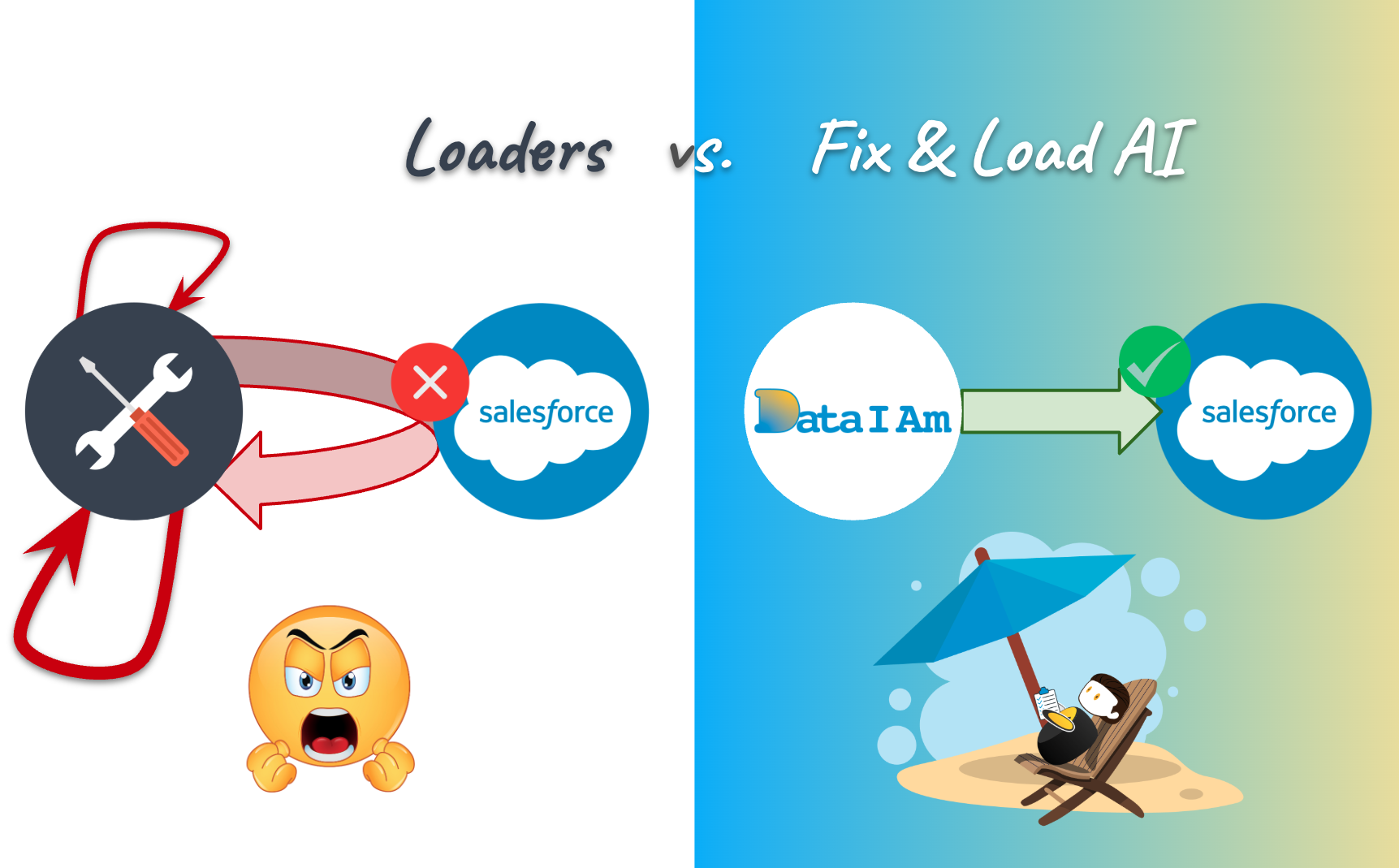
    The good news: the market for Salesforce data loaders is huge. There’s room for multiple tools to succeed, each serving different types of users. DataIAm is a modern alternative designed specifically for admins and analysts who want speed, accuracy, and automation in one AI-powered tool.


    Salesforce Data Loader: An Engineer’s Side Project

    Salesforce Data Loader was originally built by an engineer as a side project. It’s a Java-based desktop app, now at v64, but visually and functionally it looks much like its earliest versions.

    Why admins still use it: it’s free and “good enough” for very basic Salesforce imports and exports.

    The problems:

    • No meaningful enhancements in years.
    • Bugs often unresolved.
    • Runs locally on users machine as a Java app.

    MuleSoft dataloader.io: A Marketing Project

    MuleSoft dataloader.io grew into the most popular alternative to Salesforce Data Loader, but it wasn’t engineering-led—it was launched by MuleSoft’s marketing team to funnel users into their expensive Anypoint platform.

    Signs of stagnation:

    • Last announced support for Salesforce API was v37 (Feb 2018). Current Salesforce API is v64.
    • A release announcement titled, “dataloader.io 1.0 has been released!”, is (likely incorrectly) dated Feb 14, 2024.
    • Last release notes were posted in January 2022 – over 2.5 years ago.
    • The product demo video were posted 10 years. 
    • IdeaExchange requests with hundreds of votes—like “Restrict picklist values for a standard field” (submitted in 2017, with 549 votes)—remains unresolved.
    • In 2022 MuleSoft lowered the cap on Free plan from 50,000 to 10,000 rows per month.

    And if that weren’t enough, dataloader.io Enterprise plan now runs $299 per user per month—with no team discounts.


    Jitterbit Salesforce Data Loader: Free but Forgotten

    Jitterbit Data Loader is only partially cloud-based as it still requires a local engine. That means admins must keep their machines running for scheduled jobs. Support is minimal (community-only), and macOS version is no longer updated.


    Informatica Data Loader: Moved On

    Informatica has pivoted to data warehouses and lakehouses like Snowflake and Databricks. A Salesforce-specific loader is no longer their priority.


    Why DataIAm Is Different: Fix & Load with AI

    DataIAm was built exclusively for Salesforce users who want more than just a data loader. It fixes errors automatically before loading, saving admins time and reducing mistakes

    Key Differentiators

    • Fix & Load: Automatically repair CSV structure issues, invalid picklist values, missing Record IDs, inconsistent date formats, abbreviated currency values, and more.
    • Actively Listening: We monitor IdeaExchange, Reddit, and LinkedIn. Features Salesforce admins begged MuleSoft for are already in DataIAm v1—for example, catching invalid picklist values.
    • Urgency & Focus: 100% dedicated to Salesforce data management. No side projects, no marketing funnels. Requests don’t sit ignored. Direct line: support@dataiam.com.

    Feature Comparison: DataIAm vs dataloader.io

    DataIAm’s full Salesforce data loader feature comparison is available here: Compare Capabilities.

    Highlights of AI-powered features you won’t find in dataloader.io:

    • Fix file structure: Split single columns e.g., Address → Street, City, State, Zip.
    • Map fields by values: Automatically fix missing or incorrect headers by analyzing the values in the column before mapping.
    • Validate picklists: Flag and fix invalid picklist values before upload.
    • Remove inconsistencies: Standardize addresses, phone numbers, dates, and currency formats.
    • Fetch missing IDs: Auto-fill missing Salesforce Record IDs (for Update and Upsert jobs).
    • Smart Lookup: VLOOKUP-style matching between Salesforce objects and your file from within the app.
    • Preview data: See fixed data before upload.
    • Restore/Undelete: Recover deleted Salesforce records.
    • High capacity, low cost:
      • Freemium 100k rows ← 10x more capacity than dataloder.io
      • Enterprise $39/month for unlimited records ← 7x cheaper than dataloader.io

    The Bottom Line

    The first generation of Salesforce data loaders were side projects, marketing tools, or afterthoughts. They’ve been stagnant for years, frustrating Salesforce admins and analysts.

    DataIAm is different. Built for 2025 and beyond, it:

    • Uses AI to fix and load data
    • Eliminates manual data cleansing in spreadsheets
    • Saves admins and analysts hours every week

    If you want faster, smarter, and more reliable Salesforce data loading tool, start with the DataIAm Freemium plan for $0 and experience AI-powered loading firsthand.


    To learn more about DataIAm visit: https://dataiam.com

    Zeb Mahmood

    Zeb Mahmood Co-Founder & CEO DataIAm

  • Now querying: Related objects

    Now querying: Related objects

    Let’s be honest—querying related objects in Salesforce isn’t exactly fun.

    If you’ve ever tried pulling a report of Opportunities along with Account names and the Owners’ aliases, you’ve probably ended up with multiple browser tabs open for SOQL dot notation help, a couple of manual VLOOKUPs, and maybe even a silent prayer.

    We’ve been there. So we made it better.

    We’re thrilled to announce a major upgrade to our Extract functionality (a.k.a. Salesforce Query Builder) in DataIAm:

    You can now query related objects in Salesforce—with just a few clicks!

    What Are Related Objects in Salesforce?

    Salesforce data is stored in a web of related objects—like linked database tables. A few examples:

    • A Contact belongs to an Account
    • An Opportunity is tied to both an Account and an Owner
    • A Case links to a Contact and an Account

    Also see: Object Relationships Overview by Salesforce


    How to Query Related Objects with DataIAm

    Until now, if you wanted to export data with related fields, you had to export one object at a time, merge them in Excel using VLOOKUP, and hope nothing breaks.

    But now you can: choose your base object, then select related fields across related objects—visually and with zero SOQL (yes, no guessing the dot-notation syntax).

    ✅ Select any standard or custom Salesforce object
    ✅ Browse related objects and pick the fields you want
    ✅ Preview your result set before full extraction

    It’s clean, intuitive, and designed for Salesforce admins, analysts, and consultants who just want the data—without the SOQL and spreadsheet drama.

    ⚠️ Like native SOQL and most third-party tools, you can go up the relationship chain — from child to parent (e.g., Opportunity → Account → Owner). However, you can’t yet go down (e.g., Account → all Contacts). We’re working on a way to support that for you — even though SOQL itself doesn’t natively allow it.


    Example: Query Related Salesforce Data

    Let’s say your manager asks for a list of open Opportunities that includes:

    • Opportunity Name
    • Account Name
    • Owner’s Alias

    In DataIAm, just:

    1. Select the Opportunity object and the Name field
    2. From Related Objects:
      • Choose Account → Name
      • Choose Owner → Alias
    3. See the auto-generated SOQL:
      SELECT Name, Account.Name, Owner.Alias FROM Opportunity
    4. Preview result set → Run job → Done!

    Also see the blog post: Visual Query Builder


    Modern DataIAm vs. Clunky Old Data Loaders

    With this latest enhancement, DataIAm is now more functionally capable than any leading data loader in the market. (Not bragging — just stating the facts.)

    Unlike traditional tools, DataIAm includes smart, AI-powered capabilities like:

    ✅ Flagging and fixing invalid picklist values
    ✅ Fetching missing Record IDs
    ✅ Correcting inconsistent data formats
    ✅ Previewing (and downloading) cleaned data before loading

    Want to see how DataIAm compares to Salesforce Data Loader (desktop) and MuleSoft dataloader.io? Check out our side-by-side feature comparison — a.k.a. the “truth table” — right here: https://dataiam.com/#data-loaders-side-by-side 


    TL;DR

    You can now query related objects in Salesforce using the DataIAm SOQL Query Builder—a visual, no-code way to quickly extract Salesforce data from related objects.

    No SOQL scribbling → SOQL with dot notation is generated for you

    No VLOOKUP dance → Select related fields visually

    No trial-and-error guessing → Preview the result set before exporting


    Try it FREE at: dataiam.com
    Or email our co-founder, Zeb, at TryNewThings@dataiam.com for a live walkthrough.
    We’d love to hear your use case!


    About the Author

    Zeb Mahmood has spent his career unlocking business value by moving, fixing, and loading data—first as an engineer, then as a product leader, and now as a cofounder.

    With 2 decades in product management, 9 years at Salesforce, and hands-on experience in early-stage startups, he’s learned a simple truth: data is the lifeblood of every business. But when it’s messy or trapped in spreadsheets, it can’t drive impact.

    That’s why Zeb cofounded DataIAm — a Fix & Load AI built for Salesforce Admins and data handlers who just want their data to work. No frustration. No failed imports. Just clean, reliable data that loads seamlessly into Salesforce and delivers results.

    Zeb believes great products don’t win on tech alone — they win through empathy. Empathy for users, buyers, partners, and the people building the product every day.

    Zeb Mahmood

    Zeb Mahmood Co-Founder & CEO DataIAm

  • Visual data cleaning

    Visual data cleaning

    Don’t just imagine how your data will look after you apply fixes. See it — before you load.

    If you’ve used any Salesforce data loader — whether it’s Salesforce’s own tools (like Salesforce Data Loader or MuleSoft dataloader.io) or third-party options like Informatica or Jitterbit — you know the routine: upload a CSV, map fields, apply data transforms, hit load, and hope everything works.

    What’s missing? Visibility. These tools don’t show you how your data will actually look after data transforms are applied. 

    That’s where visual data fixes come in — only from DataIAm.

    What Makes It Visual?

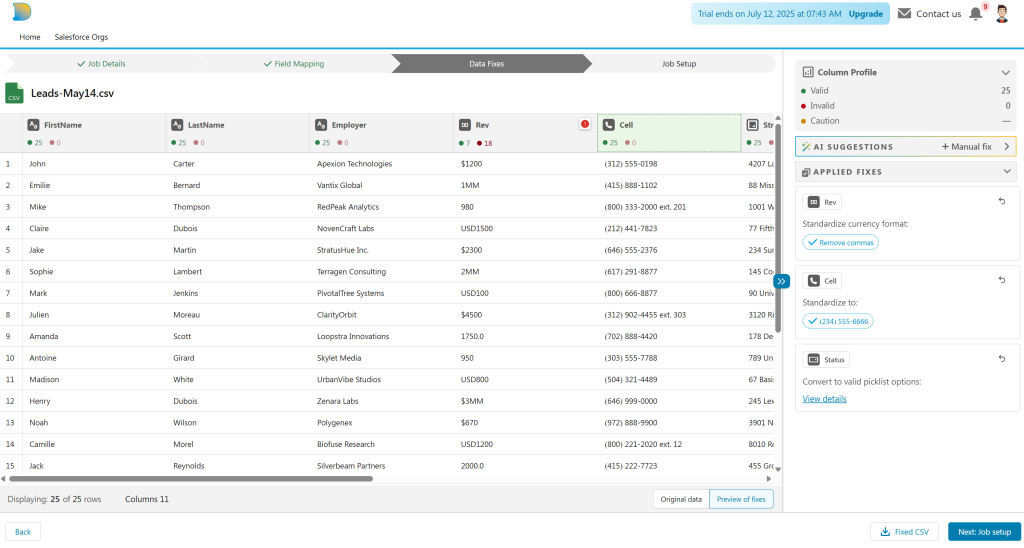
    The magic happens on the Data Fixes screen.

    After you upload your spreadsheet or CSV, DataIAm does a column-by-column health check. You see how many values are valid, and which ones need fixing. For the invalid ones, AI steps in to help — suggesting fixes (aka data transforms) that are specific to your Salesforce org’s schema; including custom fields and objects.

    Examples of AI-suggested fixes include:

    • Converting invalid picklist values
    • Standardizing phone numbers
    • Fetching missing Record IDs for update jobs

    And here’s the best part, the visuals: you see the data change right in front of you — before anything is sent to Salesforce. No guesswork. No risky trial runs. Just clarity.

    You can toggle between “Original data” and “Preview of fixes” tabs to compare before-and-after values. You can even download the cleaned file before you move forward.

    It’s a What You See Is What You Get (WYSIWYG) approach to Salesforce data — finally.

    More Than a Data Loader

    Even if visual data fixes were all we offered, it would make DataIAm worth using. But there’s much more under the hood:

    • Insert, update, upsert, delete, and extract jobs
    • AI-powered field mapping — even when your spreadsheet has no headers
    • Visual SOQL query builder with result-set preview
    • Smart V-Lookup (coming soon!) — think VLOOKUP function of spreadsheets, but purpose-built for Salesforce data loading use cases

    Try It Free

    Experience a new way to fix and load Salesforce data.  Sign up for free

    Have suggestions? Something you’d love to see? Email us at TryNewThings@dataiam.com


    Keywords: #SalesforceDataLoader #SalesforceAdmin #VisualDataFixes #DataQuality #DataCleaning


    About the Author

    Zeb Mahmood has spent his career unlocking business value by moving, fixing, and loading data—first as an engineer, then as a product leader, and now as a cofounder.

    With 2 decades in product management, 9 years at Salesforce, and hands-on experience in early-stage startups, he’s learned a simple truth: data is the lifeblood of every business. But when it’s messy or trapped in spreadsheets, it can’t drive impact.

    That’s why Zeb cofounded DataIAm — a Fix & Load AI built for Salesforce Admins and data handlers who just want their data to work. No frustration. No failed imports. Just clean, reliable data that loads seamlessly into Salesforce and delivers results.

    Zeb believes great products don’t win on tech alone — they win through empathy. Empathy for users, buyers, partners, and the people building the product every day.

    Zeb Mahmood

    Zeb Mahmood Co-Founder & CEO DataIAm

  • SOQL Query Builder

    SOQL Query Builder

    Salesforce users have long sought easier ways to build Salesforce Object Query Language (SOQL) queries. Feature requests like this IdeaExchange post highlight the demand for a query builder that’s more usable and intuitive.

    While Salesforce does offer tools like the Query Editor, they come with several limitations:

    • Limited or no support for browsing custom objects or fields
    • No visibility into field data types or relevant operators
    • Limited or no support for related objects
    • No generation of date literals for date/datetime fields

    DataIAm addresses these gaps with a visual SOQL query builder, available at app.dataiam.com.

    Generate SOQL Queries with Confidence

    Query Builder

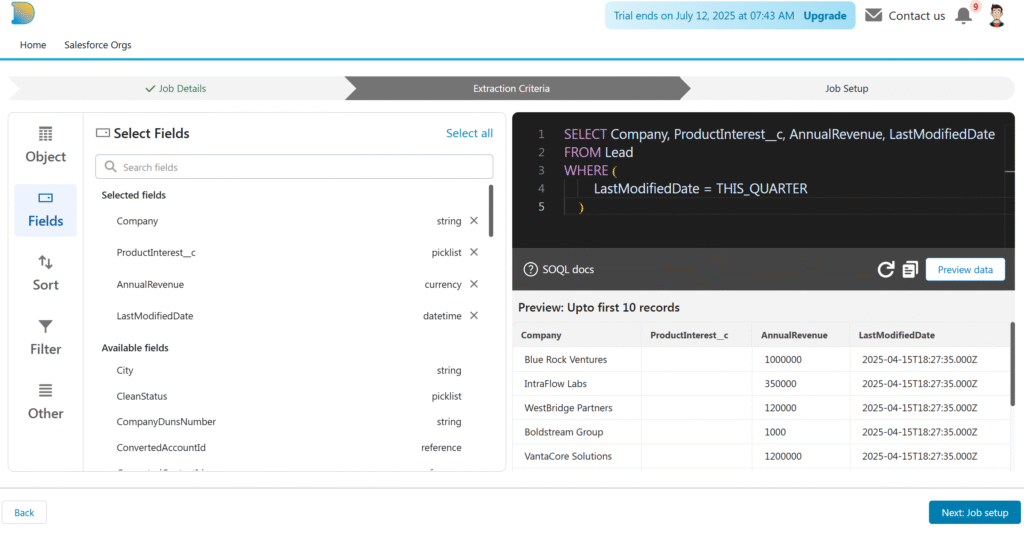
    DataIAm offers a visual query builder designed for Salesforce admins and business users who want to build valid, reliable SOQL queries—without handwriting SOQL.

    Key Capabilities

    Browse standard and custom objects

    Explore objects and fields—both standard and custom—through a clean, point-and-click interface.

    Data type–aware filtering

    Only relevant operators are shown based on each field’s data type. For example:

    • =, <, > for numeric fields
    • CONTAINS, STARTS WITH, ENDS WITH for text fields

    Date literal support

    For date fields like LastModifiedDate, the builder presents Salesforce-supported date literals such as YESTERDAY, LAST WEEK, LAST QUARTER, and more—removing the need to look up syntax.

    Relationship navigation

    Easily access fields from related objects (e.g., pulling Contact fields while querying Account records).

    Syntax validation

    Perform client-side SOQL syntax validation before submitting the query to Salesforce; avoid unnecessary API errors or quota waste.

    Data preview

    Preview the result set before executing the full query.

    Part of a Feature-Rich Data Loader

    The query builder is part of the broader DataIAm platform, which also includes:

    • Insert, update, upsert, and delete operations (lookup coming soon)
    • AI-powered field mapping between CSV columns and Salesforce fields
    • CSV file restructuring to enable 1-to-1 column-to-field mappings
    • Automated data fixes for invalid picklist values, missing Record IDs, and formatting errors

    Together, these capabilities allow non-engineers (e.g. Salesforce administrators) to handle complex data loads and extracts—filling important functionality gaps left by native Salesforce Data Loader and many third-party tools.

    Try It and Tell Us What You Think

    DataIAm is continuously evolving based on user feedback. Have suggestions or feature requests? Reach out at TryNewThings@dataiam.com.

    To try the query builder, sign up for free access →


    About the Author

    Zeb Mahmood has spent his career unlocking business value by moving, fixing, and loading data—first as an engineer, then as a product leader, and now as a cofounder.

    With 2 decades in product management, 9 years at Salesforce, and hands-on experience in early-stage startups, he’s learned a simple truth: data is the lifeblood of every business. But when it’s messy or trapped in spreadsheets, it can’t drive impact.

    That’s why Zeb cofounded DataIAm — a Fix & Load AI built for Salesforce Admins and data handlers who just want their data to work. No frustration. No failed imports. Just clean, reliable data that loads seamlessly into Salesforce and delivers results.

    Zeb believes great products don’t win on tech alone — they win through empathy. Empathy for users, buyers, partners, and the people building the product every day.

    Zeb Mahmood

    Zeb Mahmood Co-Founder & CEO DataIAm